Calendara
AI that extracts calendar events from photos. Snap a flyer, get events in your calendar.
The flyer that started it all.
This is the photo that made me build Calendara.
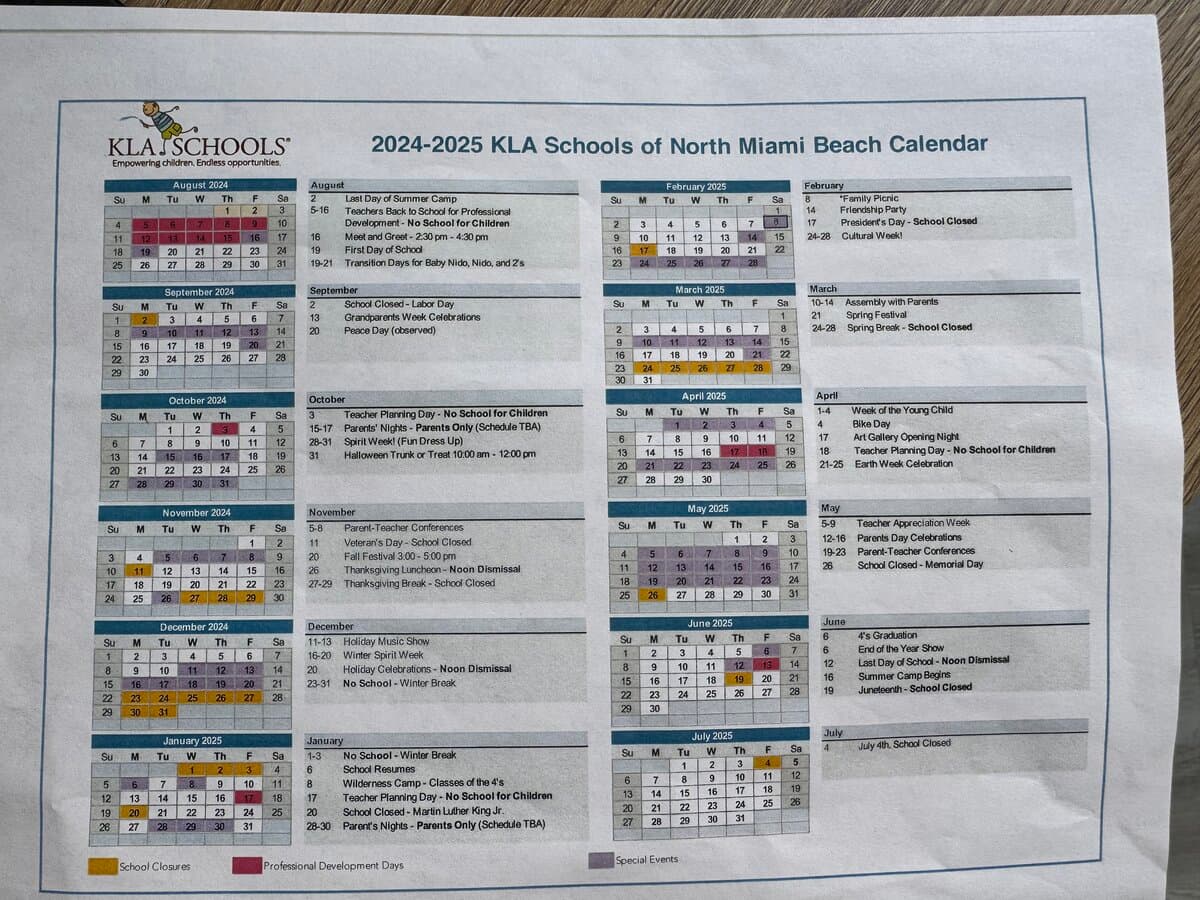
Look at this thing. Twelve months of school events. Parent-teacher conferences. Spirit weeks. Early dismissals. Holiday shows. No School for Children days scattered everywhere. The calendar uses three different color codes.
I took this photo in August 2024. I told myself I'd add everything to Google Calendar "later."
Later never came.
By October, I'd missed a parent-teacher conference. The noon dismissal before Thanksgiving caught me off guard. I kept checking the photo, squinting at dates, then forgetting what I'd checked.
This shouldn't bother me as much as it does. It's just a calendar. But something about the gap between "I have this information" and "this information is in my calendar" felt like a personal failure. It wasn't. It was a friction problem.
I wanted to build something.
Not because the world needed another calendar tool. But because I'd never shipped a real product end-to-end. I'd been a PM for years - writing specs, coordinating engineers, watching things ship. But I'd never done the whole thing myself. Idea to code to payment flow to production. The full lifecycle.
Calendara was my excuse to learn.
The problem was real enough. I lived it. Every parent I mentioned it to nodded immediately. The validation wasn't "cool idea" - it was "I have five of those photos in my camera roll right now."
So I started building.
The core insight is simple: calendar apps are fine. Google Calendar works. Apple Calendar works. The problem isn't managing events. It's getting them in there.
We receive calendar information as images constantly:
- School flyers with event dates
- Conference schedules as PDFs
- Meeting screenshots from Slack
- Sports team calendars as photos
- Class syllabi with due dates
- Appointment cards from doctors
These aren't images. They're information trapped in image form, waiting for someone to do the tedious work of transcription.
That tedious work looks like this:
- Open the photo
- Squint at the dates
- Open calendar app
- Type event title
- Set date (hope you read it right)
- Set time (AM or PM?)
- Add location (optional, always skipped)
- Save
- Repeat for next event
For my school calendar? That's 40+ events. Twenty minutes of careful typing, minimum. Most people just... don't.
AI can do that work. Fast.
Calendara is the bridge between image and calendar.
- Upload - Drag a photo, paste a screenshot, or snap directly on mobile
- Extract - AI reads the image and pulls out every event
- Review - See what was extracted, fix any errors
- Save - One click to Google Calendar or download an .ics file
Total time: under 30 seconds.
The school calendar that haunted me for months? Upload. Extract. Save. Done.
Building this taught me things I couldn't learn from specs.
AI models fail in weird ways. I use a waterfall: Gemini 2.5 Flash first, Claude 3.5 Haiku if that fails, GPT-4o as the last resort. Each model has different strengths. Gemini is fastest and cheapest. Claude handles edge cases well. GPT-4o is the most reliable fallback.
Why waterfall instead of just using the "best" model? Cost, speed, and reliability. Gemini Flash is 10x cheaper than GPT-4o for this task. First model to succeed wins. And redundancy means users rarely see failures.
Accuracy is tricky. 90%+ sounds good until you realize 10% of events might be wrong. My bet: "fast + reviewable" beats "slow + perfect." The review step takes seconds. The alternative is typing everything manually.
Stripe is actually nice. I'd heard horror stories about payment integration. Stripe was... fine? The docs are good. The test mode is good. I spent more time on my pricing page copy than the actual integration.
SEO is slow and weird. I wrote blog posts targeting "extract events from images." They ranked on page 2. Then page 1. Then ChatGPT started referring traffic. AI discovery is real - the SEO posts I wrote for Google are now being surfaced by AI tools recommending Calendara.
The market surprised me.
There are tools doing this, but not well, and not cross-platform.
Photo2Calendar - iOS only, $2.99 one-time purchase. Good product, locked to Apple.
EventShot - Also iOS only. Very new.
Everything else - Enterprise-focused or buried in automation tools.
The gap: a web-first tool that works on any device. That's where I'm positioned.
Calendara is $2.99/month. No free tier. I want users who value the product enough to pay for it. The subscription model means I can keep improving it - Photo2Calendar's one-time purchase doesn't get better after you buy it.
What could go wrong? Lots.
The problem might not be big enough. Maybe people just deal with it. Maybe the friction is annoying but not painful enough to pay for. Counter: the parents I talk to recognize the problem viscerally. Whether they'll pay $3/month is the real question.
Native apps might win. Photo2Calendar and EventShot are iOS apps. Native means better camera integration, share sheet support, widgets. A web app can't match that friction reduction. Counter: web-first means cross-platform from day one. Android users exist. Desktop users exist. And PWAs are getting better.
Subscription fatigue. $2.99/month is cheap, but it's another subscription. Photo2Calendar's one-time purchase might win on psychology. Counter: subscriptions mean continuous improvement. I can add features. I can make it better.
I might just be scratching my own itch. The danger of building for yourself is that maybe you're weird. Maybe most parents don't take photos of school calendars. Maybe they're more organized than me.
Counter: everyone I've talked to has photos of schedules rotting in their camera roll. But "everyone I've talked to" is a small sample.
What's shipped:
- AI extraction from images and PDFs
- Multiple AI models (Gemini, Claude, GPT-4o)
- Google Calendar integration
- iCal export
- $2.99/mo subscription via Stripe
- SEO content that's actually ranking
What's next:
- Recurring event detection ("every Tuesday" → recurring calendar event)
- Calendar sharing for families
- Deeper AI comprehension (understanding "next week" or "after spring break")
What I learned:
Shipping is different from planning. The gap between "I understand how this should work" and "I made this work" is larger than I expected. Every decision compounds. Every shortcut haunts you. Every thing you didn't test breaks in production.
But also: it's possible. One person can build a real product. Not a toy. Not a prototype. A thing that solves a problem and people pay for.
That school calendar still lives in my camera roll. But now it also lives in Google Calendar. Every event. Automatically.
That's the whole point.
Calendara
Extract calendar events from images with AI. Upload a photo, get events in your calendar in seconds.
usecalendara.com